
 +86 18126095160
 bella@noparde.com



2026-04-22 251
text projectors have become indispensable tools for businesses, events, and even personal use—whether you’re projecting brand messages, safety warnings, event greetings, or decorative text. But with a wide range of models, technologies, and price points on the market, it’s easy to overspend on a projector that doesn’t fit your needs. To help you make a smart purchase and avoid costly mistakes, here are the 5 most critical things you need to know before buying a text projector.
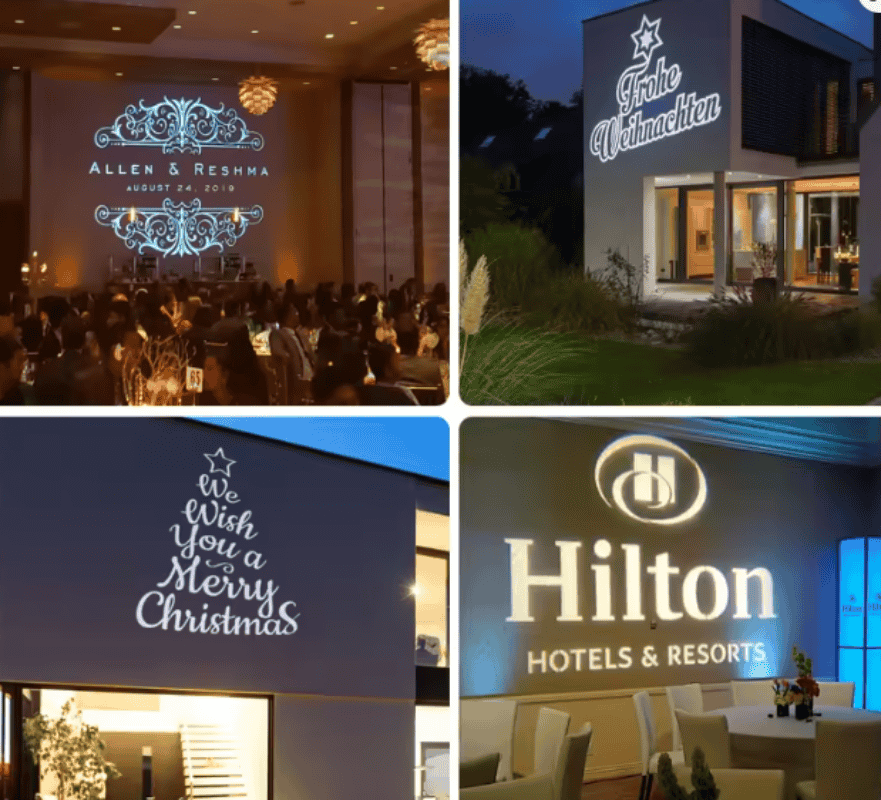
The first and most foundational step is to define where you’ll use the projector, as indoor and outdoor environments demand entirely different features. For indoor use—such as retail stores, conference rooms, or event halls—you can opt for models with a lower IP rating (IP54 or below) since they don’t need to withstand rain, dust, or extreme temperatures. These indoor projectors are often more compact and cost-effective, focusing on text clarity rather than weather resistance.
For outdoor use—like street advertising, outdoor events, or factory yards—prioritize projectors with an IP65 or IP67 waterproof and dustproof rating to ensure durability against the elements. Additionally, outdoor models require stronger brightness to combat ambient light, so avoid wasting money on indoor-only projectors that will appear dim or washed out outdoors.
Brightness, measured in lumens, is the key to clear text projection—and many buyers waste money on unnecessarily high lumens or settle for insufficient brightness. The right lumen count depends on two factors:
ambient light and projection distance. In dim indoor spaces (e.g., dark event venues, small retail stores), 1500–3000 lumens are sufficient for sharp text projection at short distances (0.5–3m).
For bright indoor areas (e.g., well-lit malls, offices) or night outdoor settings, 3000–6000 lumens are ideal to ensure text remains visible.
For outdoor daytime use or long-distance projection (5m+), opt for 6000+ lumens—cheaper, low-lumen projectors will produce blurry, unreadable text in these scenarios.
Remember: higher lumens mean higher cost, so don’t overpay for more brightness than you actually need.
Unlike image or video projectors, text projectors rely on sharp, crisp text—and cutting corners here will lead to wasted money on a device that fails to deliver.
First, focus on native resolution: for clear text (especially small or multi-line text), choose a native resolution of 1080p (Full HD) or higher; lower resolutions (e.g., 720p) will make text appear pixelated or blurry, even at short distances.
Second, pay attention to the lens: short-throw lenses (0.27–0.32 focal length) are best for close-distance projection (e.g., store entrances) and deliver sharper text edges, while long-throw lenses are better for long-distance use but may slightly reduce text sharpness.
Finally, choose the right technology: LED laser projectors are preferred for text, as they offer better brightness, color accuracy, and longevity compared to traditional bulb projectors, reducing long-term maintenance costs.
The “custom” in custom text projectors is non-negotiable—and many buyers waste money on models with limited customization options that don’t meet their needs. Avoid projectors that require expensive custom slides or professional software to modify text—these will add hidden costs and limit flexibility. Additionally, consider if you need static or dynamic text: static text is ideal for fixed messages (e.g., safety warnings), while dynamic text (rotating, scrolling) is better for advertising or events—but dynamic features often come at a premium, so only pay for them if you truly need them.
A cheap upfront price doesn’t always mean a good deal—many low-cost text projectors end up costing more in the long run due to frequent maintenance or replacement.
First, check the lamp/laser lifespan: LED laser projectors typically last 20,000–50,000 hours, while traditional bulb projectors only last 2,000–5,000 hours, requiring costly bulb replacements.
Second, consider the build quality: metal housings offer better heat dissipation and durability than plastic, making them ideal for long-term use (especially in industrial or outdoor settings).
Finally, look for models with basic maintenance features—such as easy-to-clean lenses or replaceable parts—to avoid expensive repair costs down the line. Skipping these considerations will lead to frequent replacements and wasted money over time.
Buying a text projector doesn’t have to be a costly gamble. By clarifying your scenario, matching brightness to your needs, prioritizing text clarity, checking customization capabilities, and factoring in long-term costs, you can avoid overspending and choose a projector that delivers value for money. Remember: the best text projector is not the most expensive one—it’s the one that perfectly fits your unique needs, ensuring clear, reliable text projection for years to come.